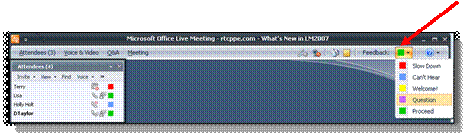
From the Feedback
menu in the upper right corner of the Meeting Client, click the appropriate option from the Feedback
to Presenter list.
Welcome and Orientation
• Now I would like to have you find and use the feedback
tool.It is in the upper right of your
screen.Please change the color to
green for proceed.(Draw arrow to
upper right, and again to point out the feedback menu on the slide.)
•Notice the other
colors there.Blue for “can’t hear”
etc.f you have trouble in today’s
training, please use this tool to let me know right away.
•I can see your
feedback color when it changes by having my attendee pane open and docked.